

When it comes to gaming, choosing between a monitor and a TV can feel confusing. You want the best experience, whether you’re aiming for lightning-fast reactions or full-screen immersion.
Should you pick a monitor for its sharp visuals and quick response, or a TV for its big, vibrant display? Your choice can change how you play, how you see the game, and even how much you enjoy it. You’ll discover the key differences, the pros and cons of each option, and what features really matter for your gaming style.
By the end, you’ll know exactly which screen fits your gaming setup perfectly. Ready to find out what suits you best? Let’s dive in!
Credit: www.rtings.com
Monitors For Gaming
Gaming monitors are built to deliver a smooth and responsive experience. They focus on speed and clarity to help players perform better. Monitors offer features that make fast gaming easier and more enjoyable.
Choosing a gaming monitor means selecting a screen designed for quick reactions and sharp images. This choice suits players who want every detail and frame to show clearly.
Low Input Lag Benefits
Input lag is the delay between your action and the game’s response. Gaming monitors have very low input lag. This means your moves happen faster on screen. Low input lag helps in fast-paced games like shooters and fighters. It can improve your reaction time and gameplay accuracy.
High Refresh Rates
Refresh rate measures how many times the screen updates per second. Most gaming monitors offer 120Hz or more, compared to 60Hz on standard screens. Higher refresh rates produce smoother motion and less blur. This makes fast action clearer and easier to follow.
Sharpness And Pixel Density
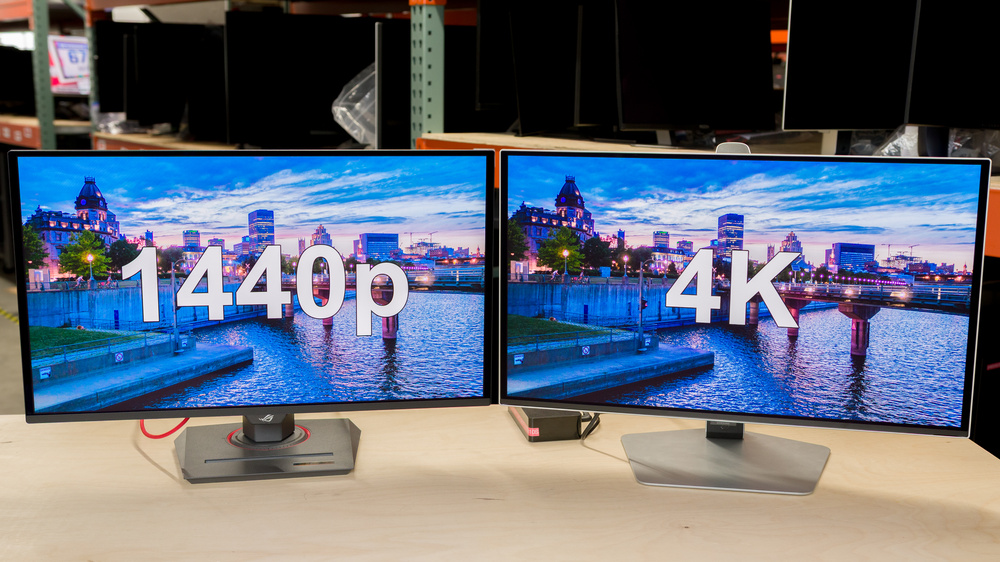
Monitors typically have higher pixel density than TVs. This means more pixels fit into a smaller space. The result is sharper images and clearer text. Sharpness is important for seeing small details, like distant enemies or tiny game elements. It adds to overall visual quality.
Ideal For Close Viewing
Most gamers sit close to their monitors, usually within a few feet. Monitors are designed for this distance. Their size and resolution work well for close-up viewing without losing clarity. This setup reduces eye strain and keeps details crisp during long gaming sessions.

Credit: www.youtube.com
Tvs For Gaming
TVs offer a unique gaming experience that many players enjoy. Their design focuses on large visuals and vibrant colors that draw you into the game world. Many gamers pick TVs for casual play, story-driven games, or social gaming sessions. Modern TVs come with features that enhance gameplay and viewing comfort. They provide a relaxed setup, perfect for living rooms and group play.
Large Screen Immersion
TVs have bigger screens than most monitors. This size creates a more immersive gaming environment. You feel like you are inside the game. This is great for adventure and role-playing games. The wide view makes details and landscapes more impressive. Large screens also help reduce eye strain during long sessions.
Vibrant Picture Quality
TVs deliver rich colors and deep contrasts. Many use HDR technology to brighten highlights and darken shadows. This makes game graphics look more lifelike and exciting. Vibrant picture quality helps you notice small game details. It improves the overall visual experience, making games more enjoyable.
Couch Co-op Experience
TVs are perfect for playing games with friends and family. The large screen lets multiple players see the action clearly. Sitting on a couch is comfortable for social gaming. This setup encourages fun and teamwork. It suits party games and shared adventures where everyone watches the screen.
Built-in Smart Features
Many TVs come with smart functions and apps. You can stream games, movies, or music without extra devices. Voice control and easy menu navigation add convenience. These features make the TV a versatile entertainment hub. Switching between gaming and other media is simple and fast.
Performance Comparison
Performance plays a key role in choosing between a monitor and a TV for gaming. It affects how smooth and responsive games feel. Understanding the differences helps pick the right screen for your style.
Each device handles input lag, response time, and refresh rate differently. These factors shape your gameplay experience. TVs now include features like Game Mode to improve performance. Let’s explore these details closely.
Input Lag Differences
Input lag is the delay between your action and the screen’s response. Monitors usually have lower input lag than TVs. This means faster reaction times in fast games.
TVs often have more processing to improve picture quality, adding lag. Game Mode on TVs reduces this delay but may not match monitors. For competitive gaming, low input lag is critical.
Response Time Variations
Response time is how fast pixels change color. Monitors often have faster response times. This reduces motion blur and ghosting in fast scenes.
TVs tend to have slower response times, making fast movements look less clear. Some modern TVs improve this, but monitors remain better for sharp visuals.
Refresh Rate Impacts
Refresh rate measures how many times the screen updates per second. Monitors commonly offer 120Hz or higher, creating smoother gameplay.
Most TVs run at 60Hz, which can feel less fluid in fast games. Newer TVs support 120Hz but at a higher cost. Higher refresh rates help reduce screen tearing and lag.
Game Mode Importance
Game Mode on TVs turns off extra processing to cut input lag. It helps TVs respond faster to your commands. This mode also adjusts colors and sharpness for gaming.
While not perfect, Game Mode narrows the performance gap between TVs and monitors. It is essential for anyone gaming on a TV to enable this mode.
Usage Scenarios
Choosing between a monitor and a TV depends a lot on how you game. Different setups suit different styles. Understanding your usage helps pick the right display. Below are common gaming scenarios to consider.
Competitive Gaming Setup
Monitors excel in competitive gaming. They offer low input lag and high refresh rates. These features help react faster in fast games like shooters. Sitting close to a monitor also improves focus and detail. Small screen size and sharp images give an edge in aiming and movement. Monitors often support higher frame rates, making gameplay smoother and more responsive.
Casual And Story-driven Play
TVs work well for casual or story-driven games. Large screens create an immersive experience. Vibrant colors and cinematic visuals add to the fun. Playing RPGs or adventure games feels more engaging on a big display. TVs with “Game Mode” reduce delay, improving play quality. The bigger size suits relaxed gaming sessions and watching cutscenes.
Console Gaming On Couch
Couch gaming favors TVs. Sitting back on a sofa fits well with a large screen. Multiple players can enjoy shared gameplay comfortably. TVs usually have built-in speakers and smart apps for entertainment. This setup suits social gaming and movie nights. Wireless controllers connect easily, keeping the area clutter-free.
Pc Gaming At Desk
PC gaming at a desk pairs best with a monitor. The close viewing distance benefits from higher pixel density. Monitors display sharper text and details. Adjustable stands help find a comfortable angle. Many monitors support adaptive sync, reducing screen tearing. This setup fits productive work and gaming in one space.
Key Features To Consider
Choosing between a monitor and a TV for gaming depends on several key features. These features affect your gaming experience, response time, and visual quality. Understanding them helps you pick the right display for your style of play.
Focus on features that impact speed, picture quality, and compatibility. These include input lag, refresh rate, HDMI support, and game mode settings. Each feature plays a specific role in delivering smooth and enjoyable gaming.
Input Lag
Input lag measures the delay between your controller and the screen response. Lower input lag means faster reaction times. Competitive gamers need very low input lag for precision and quick moves. Monitors usually have lower input lag than TVs.
Refresh Rate
Refresh rate is how many times the screen updates per second, shown in Hertz (Hz). Higher refresh rates create smoother motion. Fast-paced games benefit from 120Hz or more. Monitors often support higher refresh rates compared to most TVs.
Hdmi 2.1 Support
HDMI 2.1 allows higher resolutions and refresh rates, like 4K at 120Hz. It also supports features like variable refresh rate (VRR) and auto low latency mode (ALLM). TVs are more likely to include HDMI 2.1 ports, but some gaming monitors have them too.
Game Mode Availability
Game mode reduces processing on the TV to lower input lag. It disables extra image enhancements that cause delays. Many modern TVs have game mode to improve gaming performance. Monitors generally do not need this feature because they have minimal processing delay.
Choosing Based On Game Type
Choosing between a monitor and a TV depends a lot on the type of games you enjoy. Different games have different needs. Some require fast reactions, others benefit from large, immersive screens. Your choice should match your gaming style and setup. This section helps you decide based on popular game types.
Fast-paced Fps And Fighting Games
Monitors often win here because they have lower input lag. Fast reaction times are critical in these games. High refresh rates and quick response times give an edge. Small screens with sharp detail help track enemies easily. Sitting close to a monitor boosts precision. TVs may feel slow or blurry in fast action.
Role-playing And Adventure Games
TVs shine for RPGs and adventure games. Large screens create a cinematic experience. You see more details in landscapes and characters. Vibrant colors and deep blacks improve immersion. Playing from a couch on a TV feels relaxed. Monitors can work but lack the size for full immersion.
Multiplayer Couch Co-op
For local multiplayer, TVs offer the best experience. Big screens give each player enough space to see clearly. Shared gameplay feels more social and fun. Sitting together on a couch is more comfortable. Monitors are usually too small for multiple players side by side. TV size improves group gaming sessions.
Versatility For Media Use
TVs double as great media centers. Built-in apps let you stream movies and shows easily. Larger size makes watching content enjoyable for groups. Monitors usually lack smart features and are smaller. If gaming is just one use among many, a TV adds value. Monitors focus mainly on gaming performance and detail.
Price And Value Factors
Choosing between a monitor and a TV for gaming often comes down to price and value. Both options offer different benefits that suit various budgets and needs. Understanding cost differences, feature sets, and long-term value helps make a smarter choice for your gaming setup.
Cost Differences
Monitors usually cost less than TVs of the same size. Small monitors with high refresh rates and low input lag are often affordable. TVs tend to be bigger, which raises their price. Large TVs with advanced features like 4K and HDR can be expensive. Budget gamers might find monitors offer better value for competitive play.
Feature Sets Relative To Price
Monitors focus on fast response times and high refresh rates. These features improve gaming performance but may increase price slightly. TVs offer larger screens and better colors, which enhance immersion. Some TVs include “Game Mode” to reduce lag, adding value. Depending on your needs, paying more for specific features can be worth it.
Long-term Investment
Monitors often last longer for gaming due to specialized design. They support higher refresh rates and adaptive sync technologies. TVs may face more wear if used for gaming and other media. Choosing a good-quality monitor can save money over time. Consider how often and what types of games you play before deciding.
Future-proofing Your Setup
Future-proofing your gaming setup means choosing a display that stays relevant for years. Technology changes fast. New consoles and games demand better features. Picking a screen that supports these advances saves money and hassle. Both monitors and TVs have pros and cons here. Understanding what each offers helps you decide smartly.
Support For Next-gen Consoles
Next-gen consoles like PS5 and Xbox Series X need HDMI 2.1 ports. This allows 4K resolution at 120Hz refresh rates. Most modern TVs come with multiple HDMI 2.1 inputs. High-end gaming monitors may have one or two. Check the specs before buying. Also, consoles support variable refresh rate (VRR) to reduce screen tearing. TVs often handle VRR better than monitors. But some monitors now include FreeSync and G-Sync support. Choose a display compatible with your console’s features.
Hdr And Color Accuracy
High Dynamic Range (HDR) enhances brightness and color depth. TVs usually offer better HDR performance due to higher peak brightness. Monitors tend to have limited HDR capability. Color accuracy is vital for immersive gaming. Monitors designed for graphic work often have better color precision. Gaming TVs focus more on vivid colors for entertainment. Decide what matters more: true colors or bright, punchy visuals. Future games will use HDR more, so pick a display that handles it well.
Connectivity Options
Multiple inputs and outputs matter for a flexible setup. TVs generally have more HDMI ports and support audio output options. Monitors may offer DisplayPort, USB hubs, and headphone jacks. Some monitors provide USB-C, useful for connecting laptops or other devices. Check if the display supports audio return channel (ARC) or eARC for sound systems. A future-proof display lets you connect various gadgets easily. This reduces the need to swap devices or buy adapters later.
Credit: www.benq.eu
Frequently Asked Questions
Is It Better To Play Video Games On A Monitor Or Tv?
Monitors offer lower input lag and faster response, ideal for competitive gaming. TVs provide larger screens and immersive experiences, perfect for casual or co-op play. Choose based on game type and setup. Modern TVs with Game Mode reduce lag, narrowing the performance gap with monitors.
Why Choose A Monitor Over A Tv?
Choose a monitor for sharper images, higher pixel density, lower input lag, and faster response times. Ideal for close-up, precise tasks like PC gaming or graphic design. Monitors enhance reaction speed and detail, making them better for competitive gaming than TVs.
Can I Use A Tv As A Monitor For Gaming?
Yes, you can use a TV as a gaming monitor. TVs offer large screens and vibrant visuals but often have higher input lag than monitors. For fast-paced, competitive gaming, monitors provide quicker response times and sharper detail. Modern TVs with Game Mode reduce lag, improving gameplay experience.
Which Screen Is Better For Gaming?
Monitors suit competitive gaming with low input lag and high refresh rates. TVs offer immersive large screens, ideal for casual play and couch co-op. Choose based on your gaming style and setup preferences.
Conclusion
Choosing between a monitor and a TV depends on your gaming style. Monitors suit fast, competitive games with quick response needs. TVs offer larger screens and better immersion for casual or story-driven play. Consider your setup, distance, and game type before deciding.
Both devices have features that can enhance your experience. Prioritize low input lag and refresh rates for smoother gameplay. Game Mode on TVs helps reduce delay and improves performance. Find the balance that fits your gaming habits and enjoy your time playing.